| Writing New Devices - host | ||
|---|---|---|
 | Chapter 233. eCos Synthetic Target |  |
Name
Writing New Devices — extending the synthetic target, host-side
Description
On the host-side adding a new device means writing a Tcl/Tk script that will handle instantiation and subsequent requests from the target-side. These scripts all run in the same full interpreter, extended with various commands provided by the main I/O auxiliary code, and running in an overall GUI framework. Some knowledge of programming with Tcl/Tk is required to implement host-side device support.
Some devices can be implemented entirely using a Tcl/Tk script. For
example, if the final system will have some buttons then those can be
emulated in the synthetic target using a few Tk widgets. A simple
emulation could just have the right number of buttons in a row. A more
advanced emulation could organize the buttons with the right layout,
perhaps even matching the colour scheme, the shapes, and the relative
sizes. With other devices it may be necessary for the Tcl script to
interact with an external program, because the required functionality
cannot easily be accessed from a Tcl script. For example interacting
with a raw ethernet device involves some ioctl
calls, which is easier to do in a C program. Therefore the
ethernet.tcl script which implements the
host-side ethernet support spawns a separate program
rawether, written in C, that performs the
low-level I/O. Raw ethernet access usually also requires root
privileges, and running a small program rawether
with such privileges is somewhat less of a security risk than the
whole eCos application, the I/O auxiliary, and various dynamically
loaded Tcl scripts.
Because all scripts run in a single interpreter, some care has
to be taken to avoid accidental sharing of global variables. The best
way to avoid problems is to have each script create its own Tcl
namespace, so for example the ethernet.tcl script
creates a namespace ethernet:: and all variables
and procedures reside in this namespace. Similarly the I/O auxiliary
itself makes use of a synth:: namespace.
Building and Installation
When an eCos device driver or application code instantiates a device,
the I/O auxiliary will attempt to load a matching Tcl script. The
third argument to synth_auxiliary_instantiate
specifies the type of device, for example ethernet,
and the I/O auxiliary will append a .tcl suffix
and look for a script ethernet.tcl.
If the device being instantiated is application-specific rather than
part of an eCos package, the I/O auxiliary will look first in the
current directory, then in ~/.ecos/synth. If it is part of an eCos
package then the auxiliary will expect to find the Tcl script and any
support files below libexec/ecos in the install tree - note
that the same install tree must be used for the I/O auxiliary itself
and for any device driver support. The directory hierarchy below
libexec/ecos matches the
structure of the eCos repository, allowing multiple versions of a
package to be installed to allow for incompatible protocol changes.
The preferred way to build host-side software is to use
autoconf and automake. Usually
this involves little more than copying the
acinclude.m4, configure.in
and Makefile.am files from an existing package,
for example the synthetic target ethernet driver, and then making
minor edits. In acinclude.m4 it may be necessary
to adjust the path to the root of the repository.
configure.in may require a similar change, and
the AC_INIT macro invocation will have to be
changed to match one of the files in the new package. A critical macro
in this file is ECOS_PACKAGE_DIRS which will set
up the correct install directory. Makefile.am may
require some more changes, for example to specify the data files that
should be installed (including the Tcl script). These files should
then be processed using aclocal,
autoconf and automake in that
order. Actually building the software then just involves
configure, make and
make install, as per the instructions in the
toplevel README.host file.
To assist developers, if the environment variable
ECOSYNTH_DEVEL is set then a slightly different
algorithm is used for locating device Tcl scripts. Instead of looking
only in the install tree the I/O auxiliary will also look in the
source tree, and if the script there is more recent than the installed
version it will be used in preference. This allows developers to
modify the master copy without having to run make
install all the time.
If a script needs to know where it has been installed it can examine
the Tcl variable synth::device_install_dir . This
variable gets updated whenever a script is loaded, so if the
value may be needed later it should be saved away in a device-specific
variable.
Instantiation
The I/O auxiliary will source the device-specific Tcl script when the eCos application first attempts to instantiate a device of that type. The script should return a procedure that will be invoked to instantiate a device.
namespace eval ethernet {
    …
    proc instantiate { id instance data } {
        …
        return ethernet::handle_request
    }
}
return ethernet::instantiate
The id argument is a unique identifier for this
device instance. It will also be supplied on subsequent calls to the
request handler, and will match the return value of
synth_auxiliary_instantiate on the target side. A
common use for this value is as an array index to support multiple
instances of this types of device. The instance and
data arguments match the corresponding arguments to
synth_auxiliary_instantiate on the target side, so
a typical value for instance would be
eth0, and data is used to pass
arbitrary initialization parameters from target to host.
The actual work done by the instantiation procedure is obviously device-specific. It may involve allocating an interrupt vector, adding a device-specific subwindow to the display, opening a real Linux device, establishing a socket connection to some server, spawning a separate process to handle the actual I/O, or a combination of some or all of the above.
If the device is successfully instantiated then the return value
should be a handler for subsequent I/O requests. Otherwise the return
value should be an empty string, and on the target-side the
synth_auxiliary_instantiate call will return
-1. The script is responsible for providing
diagnostics explaining
why the device could not be instantiated.
Handling Requests
When the target-side calls
synth_auxiliary_xchgmsg, the I/O auxiliary will
end up calling the request handler for the appropriate device instance
returned during instantiation:
namespace eval ethernet {
    …
    proc handle_request { id request arg1 arg2 txdata txlen max_rxlen } {
        …
        if { <some condition> } {
            synth::send_reply <error code> 0 ""
            return
        }
        …
        synth::send_reply <reply code> $packet_len $packet
    }
    …
}
The id argument is the same device id that was
passed to the instantiate function, and is typically used as an array
index to access per-device data. The request,
arg1, arg2, and
max_rxlen are the same values that were passed to
synth_auxiliary_xchgmsg on the target-side,
although since this is a Tcl script obviously the numbers have been
converted to strings. The txdata buffer is raw data
as transmitted by the target, or an empty string if the I/O operation
does not involve any additional data. The Tcl procedures
binary scan, string index and
string range may be found especially useful when
manipulating this buffer. txlen is provided for
convenience, although string length $txdata would
give the same information.
The code for actually processing the request is of course device
specific. If the target does not expect a reply then the request
handler should just return when finished. If a reply is expected then
there should be a call to synth::send_reply. The
first argument is the reply code, and will be turned into a 32-bit
integer on the target side. The second argument specifies the length
of the reply data, and the third argument is the reply data itself.
For some devices the Tcl procedure binary format
may prove useful. If the reply involves just a code and no additional
data, the second and third arguments should be 0
and an empty string respectively.
Attempts to send a reply when none is expected, fail to send a reply when one is expected, or send a reply that is larger than the target-side expects, will all be detected by the I/O auxiliary and result in run-time error messages.
It is not possible for the host-side code to send unsolicited messages to the target. If host-side code needs attention from the target, for example because some I/O operation has completed, then an interrupt should be raised.
Interrupts
The I/O auxiliary provides a number of procedures for interrupt handling.
synth::interrupt_allocate <name>
synth::interrupt_get_max
synth::interrupt_get_devicename <vector>
synth::interrupt_raise <vector>
synth::interrupt_allocate is normally called during
device instantiation, and returns the next free interrupt vector. This
can be passed on to the target-side device driver in response to a
suitable request, and it can then install an interrupt handler on that
vector. Interrupt vector 0 is used within the
target-side code for the real-time clock, so the allocated vectors
will start at 1. The argument identifies the
device, for example eth0. This is not actually used
internally, but can be accessed by user-initialization scripts that
provide some sort of interrupt monitoring facility (typically via the
interrupt hook). It is possible for a
single device to allocate multiple interrupt vectors, but the
synthetic target supports a maximum of 32 such vectors.
synth::interrupt_get_max returns the highest
interrupt vector that has been allocated, or 0 if
there have been no calls to
synth::interrupt_allocate.
synth::interrupt_get_devicename returns the string
that was passed to synth::interrupt_allocate when
the vector was allocated.
synth::interrupt_raise can be called any time after initialization. The argument should be the vector returned by synth::interrupt_allocate for this device. It will activate the normal eCos interrupt handling mechanism so, subject to interrupts being enabled and this particular interrupt not being masked out, the appropriate ISR will run.
![[Note]](pix/note.png) | Note |
|---|---|
At this time it is not possible for a device to allocate a specific interrupt vector. The order in which interrupt vectors are assigned to devices effectively depends on the order in which the eCos devices get initialized, and that may change if the eCos application is rebuilt. A future extension may allow devices to allocate specific vectors, thus making things more deterministic. However that will introduce new problems, in particular the code will have to start worrying about requests for vectors that have already been allocated. |
Flags and Command Line Arguments
The generic I/O auxiliary code will process the standard command line arguments, and will set various flag variables accordingly. Some of these should be checked by device-specific scripts.
-
synth::flag_gui This is set when the I/O auxiliary is operating in graphical mode rather than text mode. Some functionality such as filters and the GUI layout are only available in graphical mode.
if { $synth::flag_gui } { … }-
synth::flag_verbose - The user has requested additional information during startup. Each device driver can decide how much additional information, if any, should be produced.
-
synth::flag_keep_going -
The user has specified
-kor--keep-going, so even if an error occurs the I/O auxiliary and the various device driver scripts should continue running if at all possible. Diagnostics should still be generated.
Some scripts may want to support additional command line arguments. This facility should be used with care since there is no way to prevent two different scripts from trying to use the same argument. The following Tcl procedures are available:
synth::argv_defined <name>
synth::argv_get_value <name>
synth::argv_defined returns a boolean to indicate
whether or not a particular argument is present. If the argument is
the name part of a name/value pair, an = character
should be appended. Typical uses might be:
    if { [synth::argv_defined "-o13"] } {
        …
    }

    if { [synth::argv_defined "-mark="] } {
        …
    }
The first call checks for a flag -o13 or
--o13 - the code treats options with single and
double hyphens interchangeably. The second call checks for an argument
of the form -mark=<value> or a pair of
arguments -mark <value>. The value part of a
name/value pair can be obtained using
synth::argv_get_value;
    variable speed 1
    if { [synth::argv_defined "-mark="] } {
        set mark [synth::argv_get_value "-mark="]
        if { ![string is integer $mark] || ($mark < 1) || ($mark > 9) } {
            <issue diagnostic>
        } else {
            set speed $mark
        }
    }
synth::argv_get_value should only be used after a
successful call to synth::argv_defined.
At present there is no support for some advanced forms of command line
argument processing. For example it is not possible to repeat a
certain option such as -v or
--verbose, with each occurrence increasing the level
of verbosity.
If a script is going to have its own set of command-line arguments
then it should give appropriate details if the user specifies
--help. This involves a hook function:
namespace eval my_device {
    proc help_hook { } {
        puts " -o13          : activate the omega 13 device"
        puts " -mark <speed> : set speed. Valid values are 1 to 9."
    }

    synth::hook_add "help" my_device::help_hook
}
The Target Definition File
Most device scripts will want to check entries in the target definition file for run-time configuration information. The Tcl procedures for this are as follows:
synth::tdf_has_device <name>
synth::tdf_get_devices
synth::tdf_has_option <devname> <option>
synth::tdf_get_option <devname> <option>
synth::tdf_get_options <devname> <option>
synth::tdf_get_all_options <devname>
synth::tdf_has_device can be used to check whether
or not the target definition file had an entry
synth_device <name>. Usually the name
will match the type of device, so the
console.tcl script will look for a target
definition file entry console.
synth::tdf_get_devices returns a list of all
device entries in the target definition file.
Once it is known that the target definition file has an entry for a certain device, it is possible to check for options within the entry. synth::tdf_has_option just checks for the presence, returning a boolean:
    if { [synth::tdf_has_option "console" "appearance"] } {
        …
    }
synth::tdf_get_option returns a list of all the arguments for a given option. For example, if the target definition file contains an entry:
synth_device console {
    appearance -foreground white -background black
    filter trace {^TRACE:.*} -foreground HotPink1 -hide 1
    filter xyzzy {.*xyzzy.*} -foreground PapayaWhip
}
A call
synth::tdf_get_option console appearance
will return the list {-foreground white -background
black}. This list can be manipulated using standard Tcl routines
such as llength and lindex. Some
options can occur multiple times in one entry, for example
filter in the console entry.
synth::tdf_get_options returns a list of lists,
with one entry for each option occurrence.
synth::tdf_get_all_options returns a list of lists
of all options. This time each entry will include the option name as
well.
The I/O auxiliary will not issue warnings about entries in the target
definition file for devices which were not loaded, unless the
-v or --verbose command line
argument was used. This makes it easier to use a single target
definition file for different applications. However the auxiliary will
issue warnings about options within an entry that were ignored,
because often these indicate a typing mistake of some sort. Hence a
script should always call synth::tdf_has_option,
synth:;tdf_get_option or
synth::tdf_get_options for all valid options, even
if some of the options preclude the use of others.
Hooks
Some scripts may want to take action when particular events occur, for example when the eCos application has exited and there is no need for further I/O. This is supported using hooks:
namespace eval my_device {
    …
    proc handle_ecos_exit { arg_list } {
        …
    }
    synth::hook_add "ecos_exit" my_device::handle_ecos_exit
}
It is possible for device scripts to add their own hooks and call all functions registered for those hooks. A typical use for this is by user initialization scripts that want to monitor some types of I/O. The available Tcl procedures for manipulating hooks are:
synth::hook_define <name>
synth::hook_defined <name>
synth::hook_add <name> <function>
synth::hook_call <name> <args>
synth::hook_define creates a new hook with the
specified name. This hook must not already exist.
synth::hook_defined can be used to check for the
existence of a hook. synth::hook_add allows other
scripts to register a callback function for this hook, and
synth::hook_call allows the owner script to invoke
all such callback functions. A hook must already be defined before a
callback can be attached. Therefore typically device scripts will only
use standard hooks and their own hooks, not hooks created by some
other device, because the order of device initialization is not
sufficiently defined. User scripts run from
mainrc.tcl can use any hooks that have been
defined.
synth::hook_call takes an arbitrary list of arguments, for example:
synth::hook_call "ethernet_rx" "eth0" $packet
The callback function will always be invoked with a single argument, a list of the arguments that were passed to synth::hook_call:
    proc rx_callback { arg_list } {
        set device [lindex $arg_list 0]
        set packet [lindex $arg_list 1]
    }
Although it might seem more appropriate to use Tcl's
eval procedure and have the callback functions
invoked with the right number of arguments rather than a single list,
that would cause serious problems if any of the data contained special
characters such as [ or $. The
current implementation of hooks avoids such problems, at the cost of
minor inconvenience when writing callbacks.
A number of hooks are defined as standard. Some devices will add additional hooks, and the device-specific documentation should be consulted for those. User scripts can add their own hooks if desired.
-
exit -
This hook is called just before the I/O auxiliary exits. Hence it
provides much the same functionality as
atexitin C programs. The argument list passed to the callback function will be empty. -
ecos_exit - This hook is called when the eCos application has exited. It is used mainly to shut down I/O operations: if the application is no longer running then there is no point in raising interrupts or storing incoming packets. The callback argument list will be empty.
-
ecos_initialized -
The synthetic target HAL will send a request to the I/O auxiliary once
the static constructors have been run. All devices should now have been
instantiated. A script could now check how many instances there are of
a given type of device, for example ethernet devices, and create a
little monitor window showing traffic on all the devices. The
ecos_initializedcallbacks will be run just before the user'smainrc.tclscript. The callback argument list will be empty. -
help -
This hook is also invoked once static constructors have been run, but
only if the user specified
-hor--help. Any scripts that add their own command line arguments should add a callback to this hook which outputs details of the additional arguments. The callback argument list will be empty. -
interrupt -
Whenever a device calls synth::interrupt_raise the
interrupthook will be called with a single argument, the interrupt vector. The main use for this is to allow user scripts to monitor interrupt traffic.
Output and Filters
Scripts can use conventional facilities for sending text output to the
user, for example calling puts or directly
manipulating the central text widget
.main.centre.text. However in nearly all cases it
is better to use output facilities provided by the I/O auxiliary
itself:
synth::report <msg>
synth::report_warning <msg>
synth::report_error <msg>
synth::internal_error <msg>
synth::output <msg> <filter>
synth::report is intended for messages related to
the operation of the I/O auxiliary itself, especially additional
output resulting from -v or
--verbose. If running in text mode the output will go
to standard output. If running in graphical mode the output will go to
the central text window. In both modes, use of -l or
--logfile will modify the behaviour.
synth::report_warning,
synth::report_error and
synth::internal_error have the obvious meaning,
including prepending strings such as Warning: and
Error:. When the eCos application informs the I/O
auxiliary that all static constructors have run, if at that point
there have been any calls to synth::error then the
I/O auxiliary will exit. This can be suppressed with command line
arguments -k or --keep-going.
synth::internal_error will output some information
about the current state of the I/O auxiliary and then exit
immediately. Of course it should never be necessary to call this
function.
synth::output is the main routine for outputting text. The second argument identifies a filter. If running in text mode the filter is ignored, but if running in graphical mode the filter can be used to control the appearance of this output. A typical use would be:
synth::output $line "console"
This outputs a single line of text using the
console filter. If running in graphical mode the
default appearance of this text can be modified with the
appearance option in the
synth_device console entry of the target
definition file. The menu
option can be used to change the appearance at run-time.
Filters should be created before they are used. The procedures available for this are:
synth::filter_exists <name>
synth::filter_get_list
synth::filter_add <name> [options]
synth::filter_parse_options <options> <parsed_options> <message>
synth::filter_add_parsed <name> <parsed_options>
synth::filter_exists can be used to check whether or not a particular filter already exists: creating two filters with the same name is not allowed. synth::filter_get_list returns a list of the current known filters. synth::filter_add can be used to create a new filter. The first argument names the new filter, and the remaining arguments control the initial appearance. A typical use might be:
synth::filter_add "my_device_tx" -foreground yellow -hide 1
It is assumed that the supplied arguments are valid, which typically means that they are hard-wired in the script. If instead the data comes out of a configuration file and hence may be invalid, the I/O auxiliary provides a parsing utility. Typical usage would be:
    array set parsed_options [list]
    set message ""
    if { ![synth::filter_parse_options $console_appearance parsed_options message] } {
        synth::report_error \
            "Invalid entry in target definition file $synth::target_definition\
             \n  synth_device \"console\", entry \"appearance\"\n$message"
    } else {
        synth::filter_add_parsed "console" parsed_options
    }
On success parsed_options will be updated with an
internal representation of the desired appearance, which can then be
used in a call to synth::filter_add_parsed. On
failure message will be updated with details of the
parsing error that occurred.
The Graphical Interface
When the I/O auxiliary is running in graphical mode, many scripts will want to update the user interface in some way. This may be as simple as adding another entry to the help menu for the device, or adding a new button to the toolbar. It may also involve adding new subwindows, or even creating entire new toplevel windows. These may be simple monitor windows, displaying additional information about what is going on in the system in a graphical format. Alternatively they may emulate actual I/O operations, for example button widgets could be used to emulate real physical buttons.
The I/O auxiliary does not provide many procedures related to the graphical interface. Instead it is expected that scripts will just update the widget hierarchy directly.
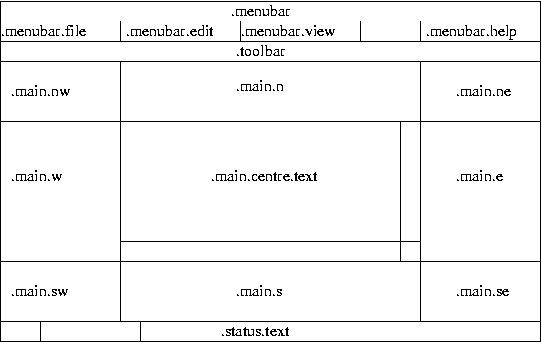
So adding a new item to the menu involves a
.menubar.help add operation with suitable
arguments. Adding a new button to the toolbar involves creating a
child window in .toolbar and packing it
appropriately. Scripts can create their own subwindows and then pack
it into one of .main.nw,
.main.n, .main.ne,
.main.w, .main.e,
.main.sw, .main.s or
.main.se. Normally the user should be allowed to
control this via the target
definition file. The central window .main.centre
should normally be left alone by other scripts since it gets used for
text output.
The following graphics-related utilities may be found useful:
synth::load_image <image name> <filename>
synth::register_ballon_help <widget> <message>
synth::handle_help <URL>
synth::load_image can be used to add a new image to
the current interpreter. If the specified file has a
.xbm extension then the image will be a
monochrome bitmap, otherwise it will be a colour image of some sort.
A boolean will be returned to indicate success or failure, and
suitable diagnostics will be generated if necessary.
synth::register_balloon_help provides balloon help for a specific widget, usually a button on the toolbar.
synth::handle_help is a utility routine that can be installed as the command for displaying online help, for example:
    .menubar.help add command -label "my device" -command \
[list synth::handle_help "file://$path"]| |  | |
| Writing New Devices - target |  | Porting |
| 2024-03-18 | Open Publication License |