| Chapter 5. After installation | ||
|---|---|---|
 |  | |
Chapter 5. After installation
Table of Contents
5.1. Menu Items
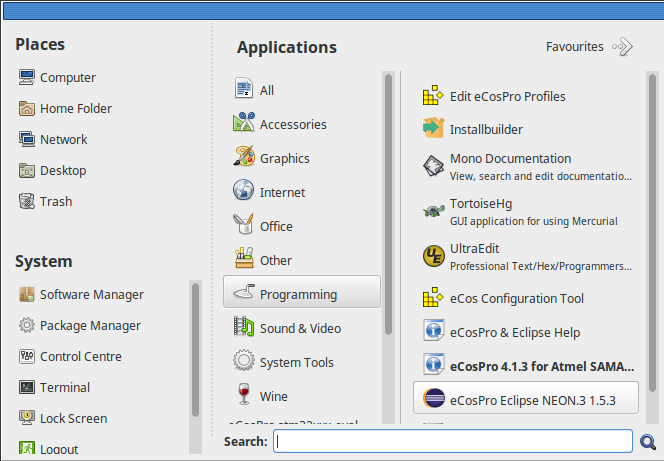
Upon the successful installation of the eCosPro Developer's Kit a new eCosPro menu group should appear in your desktop menu under Windows. On Linux, the new menu items will vary according to your distribution and version. On some distributions/versions, they will appear within a separate eCos menu group, while on others they will appear under the Development or Programming menu groups. The exact menu layout will vary according to your host operating system and distribution. The example menu layout of various operating systems is illustrated in the figures below.
The menu items are:
- Start up the eCos Configuration Tool. If more than one version of eCosPro is installed, you will be prompted for the profile to use (set consisting of default target, preferred toolchain, host tools and eCos repository), otherwise the sole profile will be use automatically.
- Start up the Eclipse Development Environment.
- This will bring up the Eclipse Documentation Window, which includes links to all recent eCosPro documentation. Unlike the browser interface to the documentation, this provides a searchable interface into the documentation for *all* locally installed documentation. This includes all locally installed eCosPro releases and the documentation of all the host tools across versions installed.
- This will start the eCos Configuration Tool in Profile Edit mode, allowing you to define new eCosPro profiles (sets consisting of default target, preferred toolchain, host tools and eCos repository).
Prompt for a profile and open a command line shell environment in a new window where the eCosPro development environment is initialised according to the selected profile. If only one profile exists, that will be automatically selected.
On Windows, this will open the chosen shell window with the preferred toolchain and host tools placed in the search
PATHwith theECOS_REPOSITORYenvirnment variable set accordingly.On Linux, this is achieved through a shell script that opens the user's default shell in one of the following terminal windows, in order of preference: x-terminal-emulator, gnome-terminal, konsole, mate-terminal, rxvt, xterm.
- This will open the master documentation index for the specified release in your default browser (or default handler for .html files). The documentation is provided primarily in HTML format so may be read by any modern web browser, but in most cases is also available in PDF format, so may also be read using a PDF viewer such as AcroRead, Acrobat, Document Viewer, etc. This same documentation is also accessible through Eclipse Help via the eCosPro & Eclipse Help option above, but has been made available through this link for developers who prefer to read in their preferred browser or did not install the eCosPro Eclipse IDE.
- (Linux only)
- This option allows you to remove eCosPro components from your system. See Chapter 10, Uninstalling.
Figure 5.1. eCosPro Menu Group on Windows 10
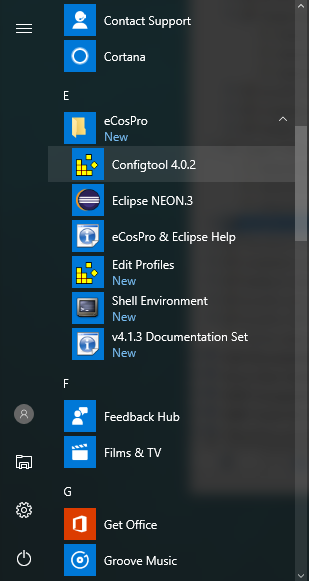
Figure 5.2. eCosPro Menu Group on Mint 18
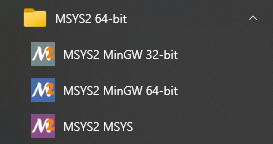
On Windows, if MSYS2 is installed, you may have the following additional menu items. These will open terminal windows in the selected MinGW environment.
Figure 5.3. Windows MSYS2 Menu
![[Note]](pix/note.png) | Note |
|---|---|
|
5.2. Windows 10 Security Alert
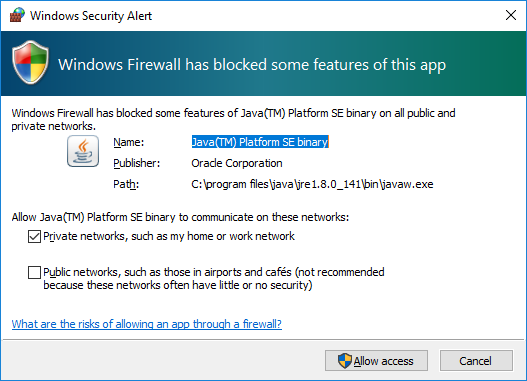
When starting the Eclipse & eCosPro Help from either
the menu or the eCos Configuration Tool, you may
get a Windows Firewall Alert as illustrated in Figure 5.4, “Windows 10 Security Alert Screen”,
or something similar from your anti-virus or internet securoty software.
This is normal as the Eclipse help system runs a mini web-server on the development
host that serves the >Eclipse & eCosPro help pages which are then viewable
through a normal browser. You may block or allow access as desired, as long as
access to localhost or 127.0.0.1 is permitted
so documentation may be access from the same development host.
Figure 5.4. Windows 10 Security Alert Screen
5.3. Windows Defender and other Anti-Virus applications
Windows Defender and other Anti-Virus applications are known to more than double the build time of eCosPro libraries, tests and applications on Windows. This is because some Anti-Virus applications repeatedly scan the eCosPro Host and GNU Tools executables on each invocation, or whenever the eCosPro source files are read or object/image files are written.
The build time may therefore be reduced by excluding the eCosPro Developer's Kit components from repeated and unecessary scanning during the build process by your Anti-Virus and Anti-Malware software. Please refer to the help sections and documentation of your Anti-Virus and Anti-Malware software for instructions on how this may be achieved.
For convenience on hosts where Windows Defender is active, eCosPro installers released in 2021 onwards add the components they install to the Exclusion List of Windows Defender.
| | | |
| Chapter 4. Installation Walk-through |  | Chapter 6. Environment Variables |
| 2024-03-18 | eCosPro Non-Commercial Public License |